Introduction of Database Schema for Student Admission System
Managing a school or university admission cycle can quickly turn into a chaotic puzzle. Every academic year, thousands of applicants submit personal details, transcripts, identity documents, and fee vouchers. If your backend data structure is poorly planned, applications get dropped, payments go missing, and tracking a student's progress through the enrollment pipeline becomes a nightmare.
Building a trackable, high-performance enrollment pipeline requires a reliable data foundation. In this comprehensive guide, you will learn exactly how to architect a production-ready database schema for student admission system workflows. We will move away from messy, single-table spreadsheets and design a normalized, relational SQL structure capable of tracking an application from the initial draft to final enrollment.
Whether you are constructing a custom portal for a local college or scaling an enterprise university platform, this architecture ensures high speed, data integrity, and real-time status visibility. We will break down complex database concepts into simple, everyday ideas so that anyone can follow along and implement them effortlessly. Let's dive into the core engine of a modern student admission tracking system.
Core Content Sections
Understanding the Admission Lifecycle
Before writing code or defining columns, we must map out how an application behaves in the real world. A student admission form is not a static document; it is a live process that passes through distinct phases.
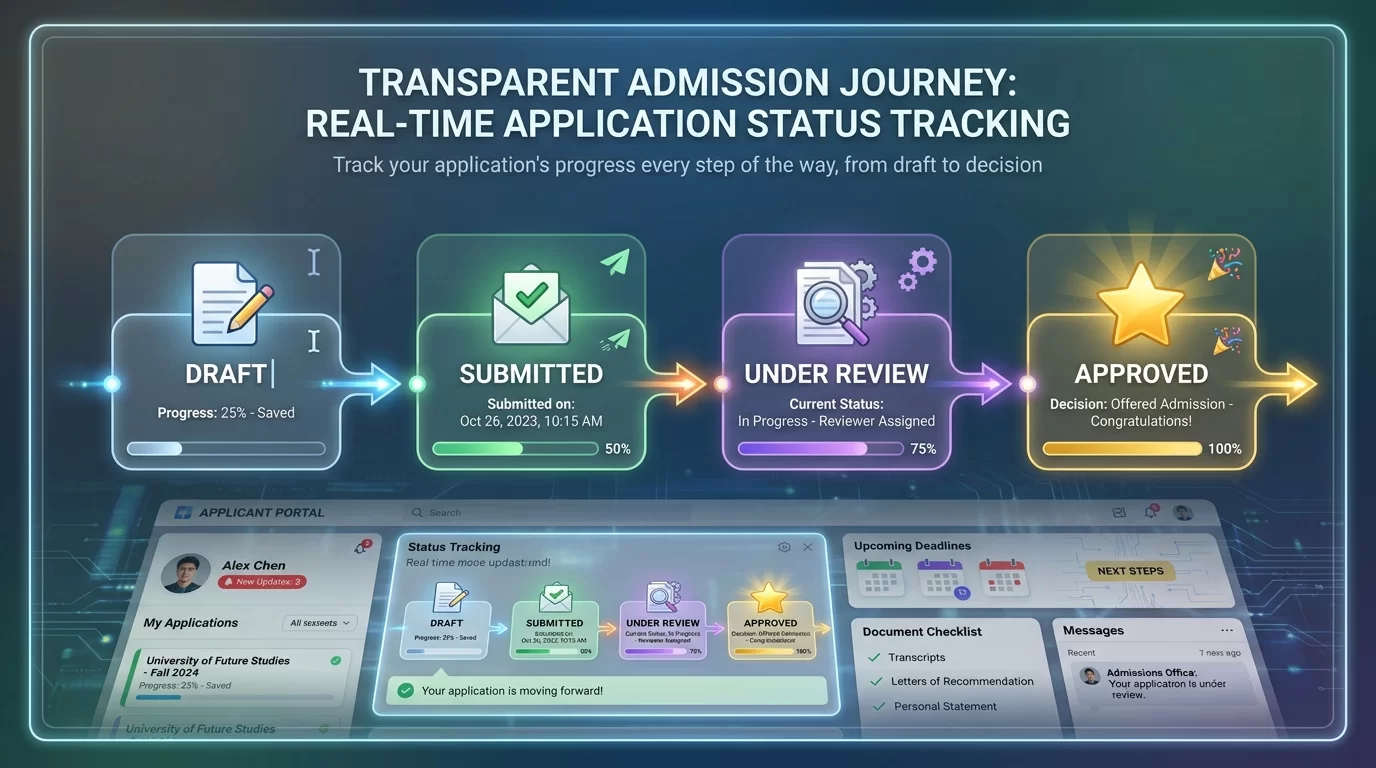
[Draft] ➔ [Submitted] ➔ [Under Review] ➔ [Action Required] ➔ [Approved/Rejected]
An applicant begins by creating an account and starting a draft. They might fill out their personal info today, upload their transcripts tomorrow, and pay the processing fee next week. Once they hit submit, the admissions staff takes over to review documents, verify test scores, and change the status. Your database layout must seamlessly record who changed what, when it happened, and what pending items remain.
The Problem with Single-Table Layouts
Many beginner developers make the mistake of creating one massive students table containing 80 different columns to hold every piece of form data. This approach causes major structural issues:
-
Massive Null Values: If a student saves a partial draft, half of the row remains empty, wasting valuable storage space.
-
Zero History Tracking: Overwriting an application status from "Under Review" to "Rejected" deletes the historical timeline, leaving no audit trail.
-
Data Redundancy: If a student applies to three different programs, their personal name, phone number, and address are duplicated three times across the database.
To fix this, we apply a process called database normalization. We break down the data into small, logical tables that connect with each other using Primary Keys and Foreign Keys.
Designing the Core Schema Architectures
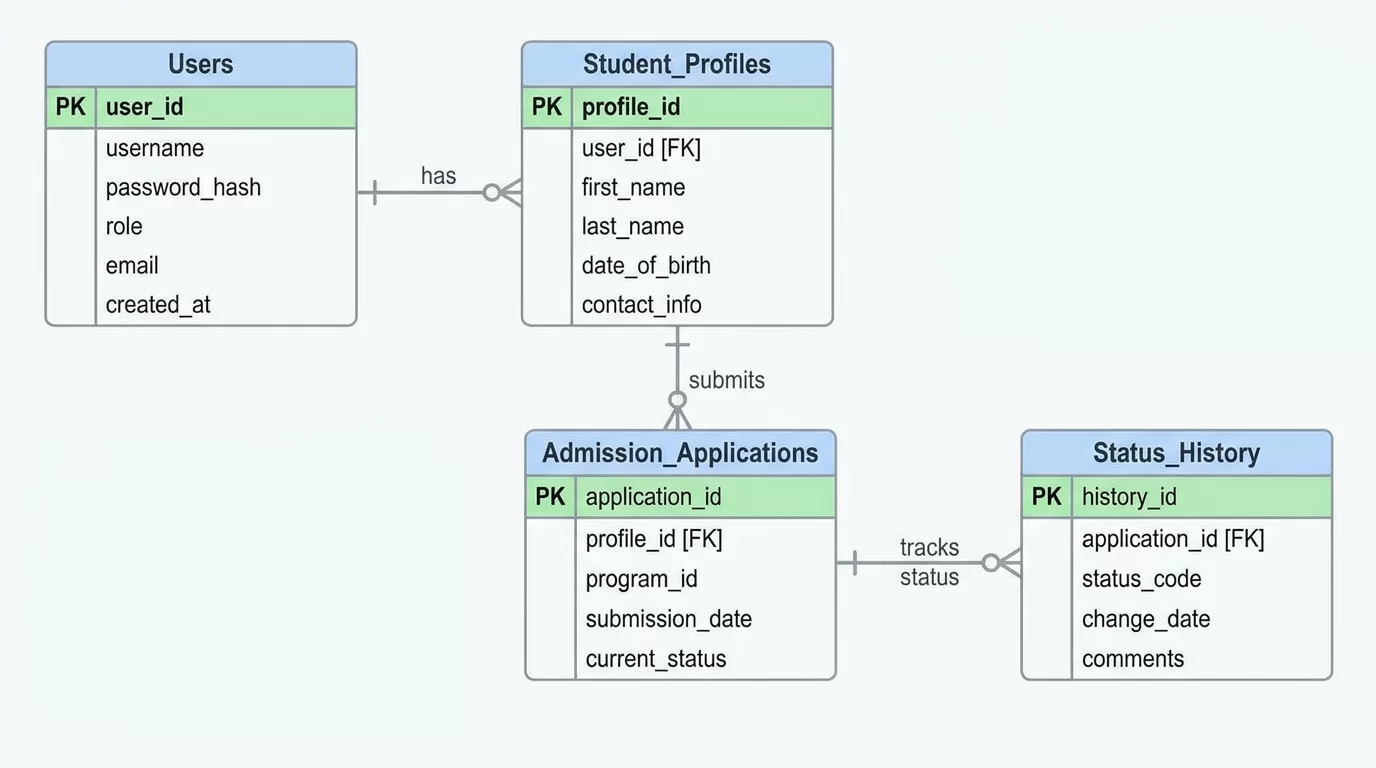
Let us break down the database design into structured, modular tables. We will organize this schema into four essential micro-modules: User Authentication, Application Management, Academic Records, and Payment Tracking.
1. User Authentication Module
Every application starts with a secure user account. This separates account credentials from the actual application data.
users Table
This table stores the essential login credentials and account verification details.
-
id(INT, Primary Key, Auto Increment): Unique identifier for the account. -
email(VARCHAR(150), Unique, Indexed): Used as the primary login identifier. -
password_hash(VARCHAR(255)): Securely hashed user password. -
phone_number(VARCHAR(20), Indexed): For SMS alerts and multi-factor verification. -
created_at(TIMESTAMP): Automatically records when the user account was created.
2. Application Core Module
This is the heart of our sql database schema for student admission form tracking strategy. It separates the applicant's profile from the specific forms they submit.
student_profiles Table
Stores permanent personal details tied directly to the user account.
-
id(INT, Primary Key, Auto Increment): Unique profile identifier. -
user_id(INT, Foreign Key referencingusers.id): Links the profile to the auth account. -
first_name(VARCHAR(50)): Student's first name. -
last_name(VARCHAR(50)): Student's family name. -
date_of_birth(DATE): Required for age eligibility checks. -
gender(VARCHAR(15)): Standardized gender field. -
permanent_address(TEXT): Full physical residential address.
admission_applications Table
Tracks each individual application form submitted by a student.
-
id(INT, Primary Key, Auto Increment): Unique tracking ID for the form. -
student_profile_id(INT, Foreign Key referencingstudent_profiles.id): Ties the form to a specific student. -
academic_program_id(INT): Foreign Key linking to the list of courses offered. -
current_status(ENUM('draft', 'submitted', 'under_review', 'action_required', 'approved', 'rejected')): Current state of the application. -
submitted_at(TIMESTAMP, Nullable): Records the exact moment the form was officially finalized.
application_status_history Table
An audit log that records every single status shift for full transparency.
-
id(INT, Primary Key, Auto Increment): Unique log entry identifier. -
application_id(INT, Foreign Key referencingadmission_applications.id): Identifies the modified form. -
previous_status(VARCHAR(30)): The state before the change. -
new_status(VARCHAR(30)): The state after the change. -
changed_by_user_id(INT, Foreign Key referencingusers.id): Tracks the staff member or student who initiated the change. -
remarks(TEXT): Internal notes detailing why an action was taken (e.g., "Transcript blurry, re-upload requested"). -
changed_at(TIMESTAMP): Time of the status transition.
3. Academic Records Module
Applicants must submit previous educational qualifications. Since a student can have multiple previous degrees (e.g., High School, O-Levels, Diplomas), we use a dedicated child table.
academic_histories Table
-
id(INT, Primary Key, Auto Increment): Unique record ID. -
application_id(INT, Foreign Key referencingadmission_applications.id): Connects these scores to a specific form. -
institution_name(VARCHAR(150)): Name of the school or college attended. -
degree_title(VARCHAR(100)): E.g., "High School Diploma" or "O-Levels". -
graduation_year(INT): Year the degree was completed. -
obtained_marks_gpa(DECIMAL(5,2)): Student's final score. -
total_marks_gpa(DECIMAL(5,2)): Maximum possible score scale. -
transcript_file_path(VARCHAR(255)): Secure server storage URL pointing to the uploaded PDF document.
4. Fee & Payment Tracking Module
An application is rarely processed until the processing fee is cleared. This module monitors financial compliance.
application_payments Table
-
id(INT, Primary Key, Auto Increment): Unique payment record ID. -
application_id(INT, Foreign Key referencingadmission_applications.id): Links the payment to the form. -
transaction_reference(VARCHAR(100), Unique, Indexed): Bank scroll or online gateway reference string. -
amount_paid(DECIMAL(10,2)): Precision-oriented monetary storage field. -
payment_method(VARCHAR(50)): E.g., "Stripe", "Bank Transfer", or "EasyPaisa". -
payment_status(ENUM('pending', 'verified', 'failed')): Verification tracking indicator. -
verified_at(TIMESTAMP, Nullable): When the accounts team confirmed the deposit.
Pro Tips for Database Optimization
-
Enforce Strict Indexing: Always apply database indexes to columns frequently targeted by filter queries, such as
current_status,email, andtransaction_reference. This keeps search lookups instantaneous even with millions of rows. -
Use DECIMAL for Financial Values: Never use
FLOATorDOUBLEdata types for application fees or financial metrics. Floating-point types introduce strange rounding bugs. Always useDECIMAL(10,2)to maintain perfect mathematical precision. -
Enforce Foreign Key Constraints: Utilize
ON DELETE RESTRICTorON DELETE CASCADEappropriately. Preventing an account from being deleted while an active application exists protects your business logs from accidental orphaned entries. -
Standardize Date Storage in UTC: Always save timestamps using UTC format on the server side. Translate the time zone within your frontend code based on the user's local device settings to avoid temporal confusion across regions.
Common Mistakes to Avoid
-
Storing Uploaded Files Inside the Database: Avoid uploading raw image or PDF data directly into your database rows using
BLOBfields. Doing so expands your database size rapidly, slowing down automated backups. Instead, upload documents directly to a secure storage container (like Amazon S3) and save the clean string URL inside your SQL column. -
Hardcoding Dynamic Status Values: Do not write random status text variables scattered throughout your application code. Utilize clear SQL
ENUMcollections or establish an independent lookup state table to enforce consistent vocabulary rules. -
Neglecting a Status Change Log Table: Relying strictly on a single status indicator inside the primary application row strips away long-term operational visibility. Without a history log, tracking a form's journey or measuring staff processing times becomes impossible.
Expanded Value Section: Advanced Tracking Architecture
To run a highly efficient admissions system, you need to look beyond standard storage tables and focus on advanced data insights. True workflow efficiency is achieved when you can analyze historical trends and identify processing bottlenecks in real time.
Calculating Operational Velocity
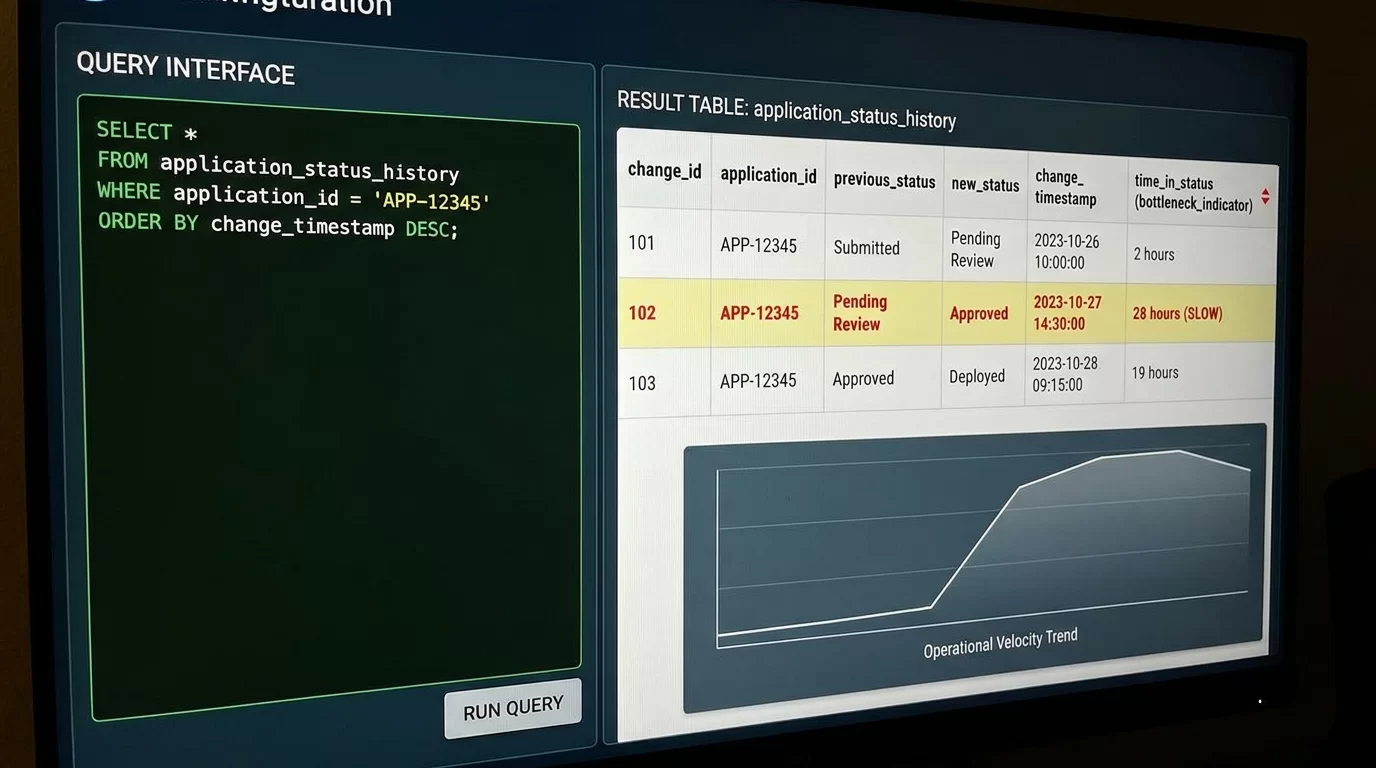
By using a structured application_status_history log table, you can calculate the exact time spent in each processing state. For example, if an application sits in the "Under Review" stage for 10 days, your system can trigger an automated alert.
You can run SQL queries to calculate the average time it takes a form to move from submission to a final decision:
SELECT
    application_id,
    AVG(TIMESTAMPDIFF(HOUR, previous_status_time, changed_at)) AS avg_hours_spent
FROM (
    SELECT
        application_id,
        changed_at,
        LAG(changed_at) OVER (PARTITION BY application_id ORDER BY changed_at) AS previous_status_time
    FROM application_status_history
) AS status_intervals
WHERE previous_status_time IS NOT NULL
GROUP BY application_id;
This analytics engine gives management clear data insights. It highlights exactly which academic departments are lagging during evaluation periods, helping teams optimize their workflow and speed up admissions.
Real-Time Pipeline Optimization
You can also build aggregated database indexes over historical columns to create real-time analytics dashboards. These dashboards show admissions teams the volume of applications moving through each stage of the funnel daily. This ensures your application system remains highly responsive, scalable, and fully transparent throughout the busiest periods of the academic year.
FAQ Section
Why should I separate user accounts from student profiles in SQL?
Separating credentials from personal profiles improves security and data flexibility. The users table handles authentication, passwords, and security settings. The student_profiles table contains personal information like names and birth dates. This separation makes it much easier to handle scenarios where one user account manages multiple applications, such as a parent submitting forms for multiple siblings.
What is the safest way to store uploaded documents in a database?
Never save raw files directly inside SQL tables using BLOB formats. This causes your database files to balloon in size, slowing down backups and degrading overall query performance. The industry standard is to upload files to an external cloud bucket, like Amazon S3 or Google Cloud Storage. Once uploaded, save the clean, secure file link URL as a standard VARCHAR string in your SQL database.
How does a status history table help track student admissions?
An application status history table acts as a continuous audit log for your system. Every time an application changes states, the system inserts a new record capturing the previous state, the new state, the user who authorized the change, and the exact timestamp. This gives you a clear historical timeline, making it easy to track application progress and audit performance bottlenecks.
Why should I use DECIMAL instead of FLOAT for storing application fees?
The FLOAT and DOUBLE data types use floating-point math, which can introduce subtle rounding errors during calculations. While a missing fraction of a cent might seem minor, it can lead to inconsistent financial balances over time. The DECIMAL(10,2) data type stores numbers as exact strings, ensuring that financial values remain perfectly precise and audit-ready.
What are the best database columns to index for fast search queries?
You should add indexes to columns that appear frequently in your WHERE, JOIN, and ORDER BY clauses. For a student admission system, the best columns to index are email in the users table, current_status in the applications table, and transaction_reference in the payments table. This keeps your system running quickly even as your data grows.
Conclusion
Designing a robust database schema for student admission system applications is all about planning for clean data relationships and long-term scalability. By organizing your data into distinct, normalized modules for users, forms, academics, and financial records, you eliminate data redundancy and prevent performance bottlenecks.
Implementing a dedicated status history log gives your admissions team deep visibility into their workflows. It turns a basic form portal into an advanced tracking engine capable of generating real-time performance insights.
As you build out your software backend, focus on clean data relationships, proper data types, and strategic indexing. Take these architecture concepts and start writing your custom SQL generation scripts today to build a fast, modern, and reliable student admissions platform.