Step-by-Step Guide to Connecting WhatsApp Cloud API PHP
Introduction
Businesses today need fast, reliable, and automated communication channels. WhatsApp has become one of the most powerful platforms for customer engagement, support, order updates, appointment reminders, and marketing communication. With billions of active users worldwide, integrating WhatsApp into your business systems can significantly improve customer experience and response times.
If you are looking for a practical guide to WhatsApp Cloud API PHP integration, you are in the right place. The WhatsApp Cloud API provided by Meta allows developers to send and receive messages directly through WhatsApp without managing their own servers or infrastructure.
In this guide, you will learn how to connect WhatsApp Cloud API with custom PHP script solutions from start to finish. We will cover account setup, API configuration, access tokens, sending messages, receiving webhooks, security best practices, troubleshooting, and advanced automation techniques.
Whether you are building a CRM integration, customer support platform, notification system, eCommerce application, or custom business software, this tutorial will help you create a stable and scalable WhatsApp integration using PHP.
By the end of this guide, you will have a complete understanding of WhatsApp API Integration and how to use PHP to communicate with WhatsApp efficiently and securely.
Understanding WhatsApp Cloud API
What is WhatsApp Cloud API?
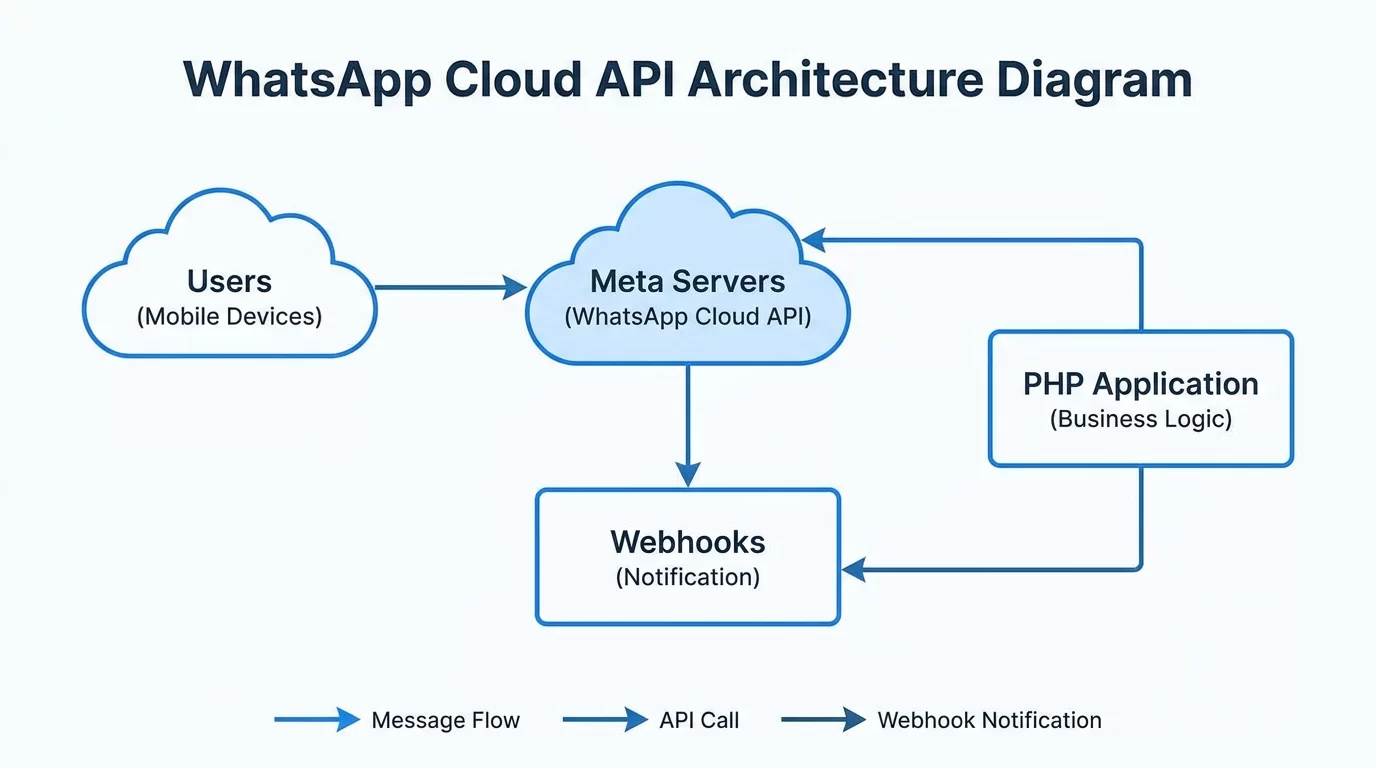
WhatsApp Cloud API is Meta's official cloud-hosted solution that enables businesses to send and receive WhatsApp messages programmatically.
Unlike older self-hosted WhatsApp Business APIs, the Cloud API is managed entirely by Meta.
Benefits include:
- No server management
- Faster setup
- Better scalability
- Reduced maintenance
- Official Meta support
- Secure infrastructure
The API allows developers to:
- Send text messages
- Send images
- Send videos
- Send documents
- Receive customer messages
- Automate conversations
- Integrate with CRM systems
This makes it ideal for modern business applications.
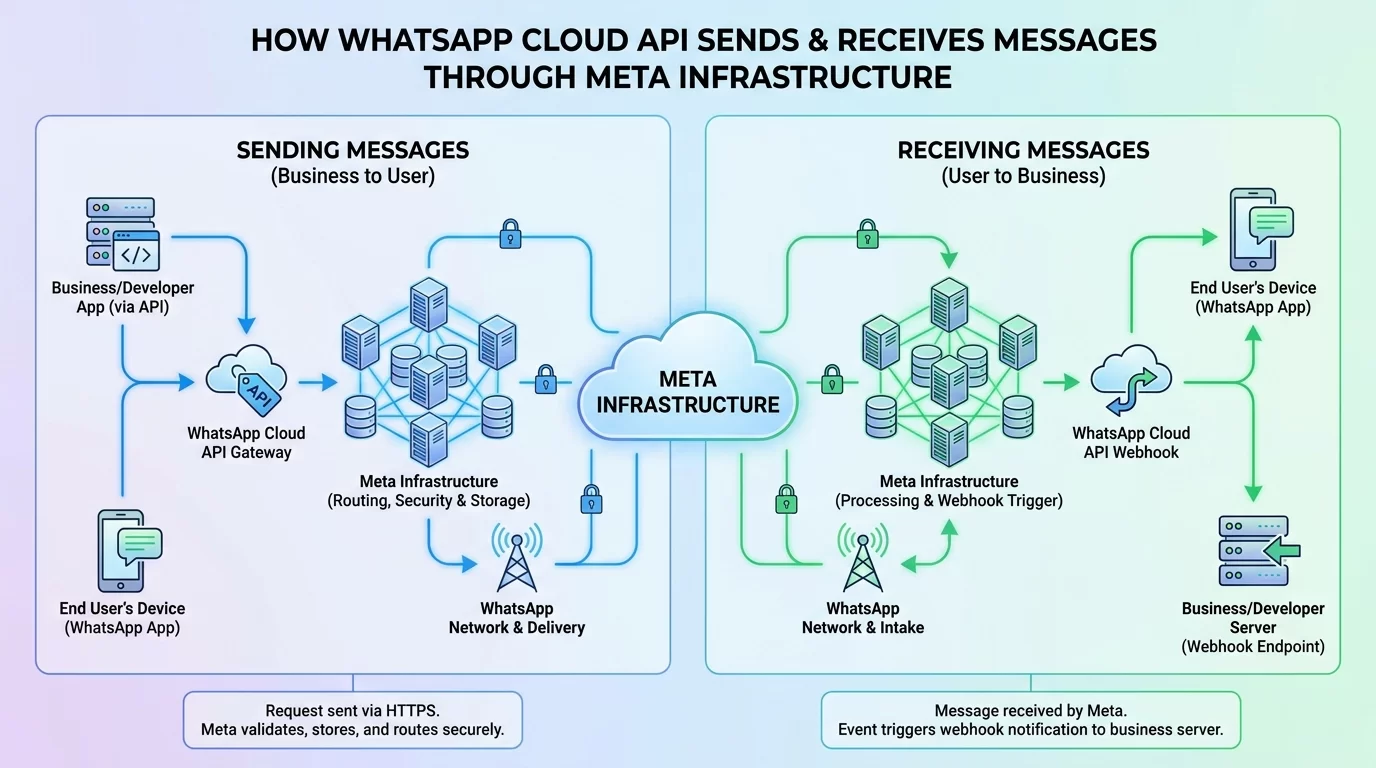
How WhatsApp Cloud API Works
The communication process is straightforward:
- Customer sends a WhatsApp message
- WhatsApp sends data to your webhook
- PHP processes the webhook
- PHP sends a response through Cloud API
- Customer receives the reply instantly
The entire workflow happens through secure API requests and webhook notifications.
Prerequisites Before Starting
Create a Meta Developer Account
Before connecting WhatsApp Cloud API with custom PHP script implementations, you need:
- Facebook account
- Meta Developer Account
- Business Verification (recommended)
- WhatsApp Business Account
Visit Meta for Developers and create a new application.
Choose:
- Business App
- WhatsApp Product
Once configured, Meta provides:
- Phone Number ID
- WhatsApp Business Account ID
- Temporary Access Token
These credentials are required for integration.
PHP Server Requirements
Your server should support:
- PHP 8.0 or higher
- cURL Extension
- OpenSSL
- HTTPS
- JSON Extension
Recommended hosting environment:
- Apache
- Nginx
- VPS
- Cloud Server
A secure HTTPS domain is required for webhook verification.
Step 1: Configure WhatsApp Cloud API
Create a WhatsApp App
Inside Meta Developer Dashboard:
- Create App
- Select Business
- Add WhatsApp Product
- Generate Access Token
Meta provides testing credentials immediately.
You will receive:
Phone Number ID
Access Token
Business Account ID
Store these values securely.
Test API Connection
Use the API Explorer inside Meta Dashboard.
Send a sample message.
If successful, your API setup is working correctly.
This helps verify credentials before writing PHP code.
Step 2: Send WhatsApp Messages Using PHP
Create a Basic PHP Script
Create a file:
send-message.phpExample:
<?php

$token = "YOUR_ACCESS_TOKEN";
$phone_number_id = "YOUR_PHONE_NUMBER_ID";

$url = "https://graph.facebook.com/v23.0/$phone_number_id/messages";

$data = [
    "messaging_product" => "whatsapp",
    "to" => "923001234567",
    "type" => "text",
    "text" => [
        "body" => "Hello from WhatsApp Cloud API"
    ]
];

$ch = curl_init($url);

curl_setopt($ch, CURLOPT_HTTPHEADER, [
    "Authorization: Bearer $token",
    "Content-Type: application/json"
]);

curl_setopt($ch, CURLOPT_POST, true);
curl_setopt($ch, CURLOPT_POSTFIELDS, json_encode($data));
curl_setopt($ch, CURLOPT_RETURNTRANSFER, true);

$response = curl_exec($ch);

curl_close($ch);

echo $response;
?>
This script sends a WhatsApp message directly through Meta's API.
Understanding the Request
Important parameters:
- messaging_product
- recipient number
- message type
- content
The API returns JSON responses that confirm successful delivery or provide error details.
Step 3: Configure Webhooks
Why Webhooks Matter
Webhooks allow your PHP application to receive incoming WhatsApp messages automatically.
Without webhooks:
- You can send messages
- You cannot receive messages
Webhooks are essential for chat automation.
Create Webhook Endpoint
Example:
<?php

$verify_token = "MY_VERIFY_TOKEN";

if ($_GET['hub_verify_token'] == $verify_token) {
    echo $_GET['hub_challenge'];
}
?>
Upload the file to:
https://yourdomain.com/webhook.phpThen configure the URL inside Meta Developer Dashboard.
Meta will verify your endpoint automatically.
Step 4: Receive Incoming Messages
Process Webhook Data
When users send messages, WhatsApp forwards data to your webhook.
Example:
<?php

$data = file_get_contents("php://input");

file_put_contents(
    "webhook-log.json",
    $data . PHP_EOL,
    FILE_APPEND
);
?>
This stores incoming webhook data for inspection.
Extract Message Information
You can decode JSON data:
$messageData = json_decode($data, true);Then access:
- Sender Number
- Message Text
- Timestamp
- Message Type
This information can be stored in your database.
Step 5: Build Automated Replies
Create Auto Responses
After receiving a message, PHP can instantly reply.
Example logic:
if(strtolower($message) == "hello"){
   sendReply("Welcome to our business.");
}
Popular automated responses include:
- Order status
- Appointment confirmations
- Support tickets
- Business hours
- FAQs
This creates a simple chatbot experience.
Real-World Example
Imagine an online store.
Customer sends:
Order StatusPHP searches database.
System returns:
Your order #12345 is currently being shipped.Everything happens automatically without staff involvement.
Security Best Practices
Protect Access Tokens
Never expose:
- Access Token
- App Secret
- API Keys
Store them in:
.envfiles or server environment variables.
Validate Incoming Requests
Always verify webhook requests.
This prevents:
- Fake requests
- Spam attacks
- Unauthorized access
Security should never be treated as optional.
Enable HTTPS
HTTPS protects:
- Customer data
- Authentication credentials
- API communication
Meta requires secure webhook endpoints.
Pro Tips for Better WhatsApp API Integration
A successful WhatsApp integration goes beyond simply sending messages.
Here are practical tips:
- Store message logs for debugging.
- Create retry systems for failed messages.
- Use queues for high-volume messaging.
- Monitor API rate limits.
- Cache frequently accessed data.
- Keep access tokens updated.
- Use database indexing for message history.
- Build an admin dashboard for monitoring.
For larger systems, separate messaging logic into dedicated PHP classes or services. This makes maintenance easier as your application grows.
Always test integrations using Meta's sandbox environment before moving to production.
A small testing effort can prevent major issues later.
Common Mistakes to Avoid
Many developers experience avoidable issues during implementation.
Avoid these common mistakes:
Hardcoding Credentials
Never place API keys directly inside public repositories.
Ignoring Error Responses
Always log API responses.
Error messages often provide the exact solution.
Missing HTTPS
Webhook verification frequently fails because HTTPS is not configured properly.
Poor Database Design
Store:
- Message IDs
- Phone Numbers
- Delivery Status
- Timestamps
This helps with reporting and troubleshooting.
No Rate Limit Handling
Sending too many requests too quickly can trigger API restrictions.
Implement request throttling where needed.
Avoiding these mistakes saves significant development time.
Advanced Integration Strategies for Growing Businesses
Once the basic integration is working, businesses can unlock much more value from WhatsApp Cloud API.
Advanced implementations often include:
CRM Integration
Automatically:
- Create leads
- Update customer records
- Track conversations
Popular integrations include:
- Salesforce
- HubSpot
- Zoho CRM
Multi-Agent Support Systems
Route incoming chats to different departments:
- Sales
- Billing
- Technical Support
- Customer Service
This improves response times.
AI-Powered Automation
Integrate:
- AI chatbots
- Knowledge bases
- Customer support workflows
This reduces workload while maintaining fast responses.
Marketing Automation
Send:
- Promotions
- Abandoned cart reminders
- Product updates
- Loyalty rewards
With proper consent, WhatsApp becomes a highly effective communication channel.
Businesses that integrate WhatsApp into their customer journey often see improved engagement, faster support resolution, and stronger customer relationships.
The real power of WhatsApp API Integration comes from combining messaging with business systems rather than treating it as a standalone communication tool.
Frequently Asked Questions
Is WhatsApp Cloud API free to use?
WhatsApp Cloud API itself does not require hosting costs because Meta manages the infrastructure. However, conversation-based pricing may apply depending on message categories and regions. Businesses should review Meta's current pricing structure before deployment. While development and testing can be done with minimal costs, production environments should account for messaging expenses, especially when handling large customer volumes.
Can I use WhatsApp Cloud API with shared hosting?
Yes, provided the hosting environment supports PHP, cURL, HTTPS, and webhook processing. Many modern shared hosting providers meet these requirements. However, for high-volume applications, VPS or cloud hosting is recommended because it offers better performance, scalability, and control over server resources. Shared hosting is generally suitable for smaller projects and testing environments.
How do webhooks help in WhatsApp integrations?
Webhooks enable real-time communication between WhatsApp and your application. Whenever a customer sends a message, WhatsApp automatically forwards the event data to your server. This allows PHP scripts to process incoming messages instantly, trigger automations, update databases, and send responses without requiring constant polling or manual checks.
Can I send images and documents through WhatsApp Cloud API?
Yes. The API supports various message types, including text, images, videos, audio files, PDFs, and other supported documents. Developers can upload media and reference it within API requests. This capability is useful for invoices, reports, marketing materials, order confirmations, and customer support documentation.
How secure is WhatsApp Cloud API?
WhatsApp Cloud API is built on Meta's secure infrastructure and supports encrypted communication. Security depends on proper implementation, including HTTPS usage, secure token storage, webhook verification, and access control. Following security best practices significantly reduces risks and protects both customer information and business systems.
Can I build a chatbot using PHP and WhatsApp Cloud API?
Absolutely. PHP can receive incoming messages through webhooks, process customer requests, query databases, and generate automated responses. Businesses commonly build chatbots for customer support, appointment scheduling, lead generation, product inquiries, and order tracking. Advanced bots can also integrate with AI systems for more intelligent conversations.
Conclusion
Connecting WhatsApp Cloud API with custom PHP scripts is one of the most effective ways to automate business communication. Whether you need customer support automation, order notifications, appointment reminders, chatbot functionality, or CRM integration, the WhatsApp Cloud API provides a reliable and scalable solution.
Throughout this guide, we covered the complete process, from setting up a Meta Developer account and obtaining API credentials to sending messages, configuring webhooks, processing incoming data, and implementing automated responses. We also explored security practices, troubleshooting advice, and advanced integration strategies that help businesses build professional messaging systems.
The key to success is starting with a clean architecture, securing your credentials, logging all API activity, and gradually expanding functionality as your business requirements grow.
If you are planning a new messaging platform or improving an existing business system, now is the perfect time to implement WhatsApp Cloud API PHP integration. With the right setup, you can create powerful communication workflows that improve customer satisfaction and save valuable time.
Also Rear https://aoneinfo.com/post/how-to-fix-a-mismatched-anonymous-defines-error-in-node-js-backend-modules