Introduction
Starting a youtube channel today is one of the best ways to share your ideas, build an audience, and even earn money online. Whether you want to teach, entertain, or promote a business, YouTube gives you a global stage. The best part? You don’t need expensive equipment or expert skills to begin.
In this complete guide, you’ll learn exactly how to create a youtube channel step by step, even if you are a complete beginner. We’ll go beyond basic setup and show you how to choose the right niche, design your channel professionally, upload your first video, and start growing your audience.
This article is written in simple, easy language so anyone can understand it. You’ll also discover practical tips, common mistakes to avoid, and advanced strategies that most beginners miss.
By the end, you’ll have a clear roadmap to not just start—but succeed—with your YouTube journey.
Understanding YouTube Channels
What is a YouTube Channel?
A youtube channel is your personal space on YouTube where you upload videos, connect with viewers, and build your brand. Think of it like your own TV channel on the internet.
Your channel includes:
- Your videos
- Channel name and logo
- Description and links
- Subscribers
Why Start a YouTube Channel?
There are many powerful reasons:
- Share knowledge or skills
- Build a personal brand
- Earn money through ads and sponsorships
- Grow a business
- Connect with a global audience
YouTube is the second largest search engine in the world, which means people are always looking for content.
Step-by-Step Guide to Create a YouTube Channel
Step 1: Create a Google Account
To create a youtube channel, you need a Google account.
- Go to Google Sign-Up page
- Enter your name, email, and password
- Verify your account
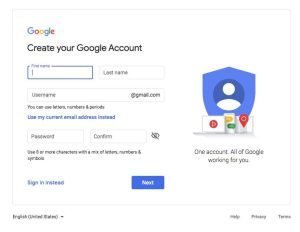
Once done, you can access YouTube easily.
Step 2: Create Your YouTube Channel
Follow these steps:
- Go to YouTube
- Click on your profile icon
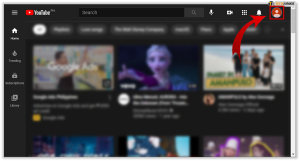
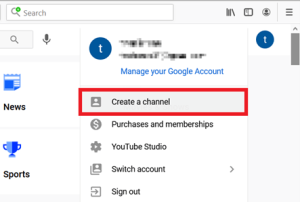
- Select “Create a Channel”
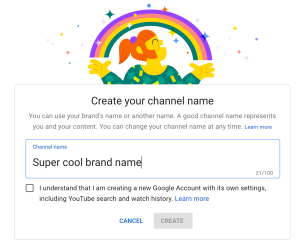
- Enter your channel name
- Upload a profile picture
- Click “Create Channel”
That’s it—your youtube channel is now live!
Step 3: Customize Your Channel
A professional look builds trust.
Add Channel Art
- Use a clean banner
- Show what your channel is about
- Keep text readable
Write a Channel Description
Explain:
- What your channel offers
- Who it’s for
- Upload schedule
Add Links
Include:
- Website
- Social media
Step 4: Choose Your Niche
A niche means your main topic.
Examples:
- Tech reviews
- Cooking
- Gaming
- Education
- Fitness
How to Choose the Right Niche
Pick something:
- You enjoy
- You can stay consistent with
- People are searching for
Step 5: Create Your First Video
Don’t wait for perfection. Start simple.
Basic Setup
- Smartphone or camera
- Good lighting (natural light works)
- Clear audio
Video Ideas for Beginners
- Introduction video
- Tutorial
- Tips and tricks
- Review
Step 6: Upload Your Video
Steps:
- Click “Create” button
- Upload video
- Add title
- Write description
- Add tags
- Choose thumbnail
- Publish
Step 7: Optimize Your Content
To help people find your videos:
- Use clear titles
- Add keywords naturally
- Write helpful descriptions
- Create attractive thumbnails
Growing Your YouTube Channel
Stay Consistent
Upload regularly. Even once a week is good.
Engage With Audience
- Reply to comments
- Ask questions
- Build community
Promote Your Videos
Share on:
Learn and Improve
Check your analytics:
- Watch time
- Views
- Audience retention
Pro Tips for Success
- Focus on value, not just views
- Keep videos simple and clear
- Use storytelling to engage viewers
- Improve video quality step by step
- Study successful channels in your niche
- Be patient—growth takes time
Consistency beats perfection. Even small improvements can make a big difference.
Common Mistakes to Avoid
Many beginners make these mistakes:
- Uploading without a plan
- Choosing too many topics
- Ignoring audio quality
- Not using thumbnails
- Giving up too early
Avoid these, and your youtube channel will grow faster.
Advanced Strategy: Building a Successful Channel Long-Term
Once your youtube channel is running, the real game begins—growth and sustainability.
Focus on Audience Retention
YouTube promotes videos that people watch longer.
To improve retention:
- Start strong (first 10 seconds matter)
- Avoid boring intros
- Keep content engaging
Create a Content Strategy
Plan your videos:
- Weekly topics
- Series content
- Trending ideas
Build a Brand
- Use same colors and style
- Create a recognizable intro
- Stay consistent in tone
Monetization Options
You can earn from:
- Ads
- Sponsorships
- Affiliate marketing
- Selling products
Learn from Data
Analytics shows what works.
Track:
- Click-through rate
- Watch time
- Subscriber growth
Use this data to improve your future videos.