
Introduction
If you’re ready to connect with friends, grow your business, or join online communities, learning how to Create Facebook Account is the first step. Facebook remains one of the world’s largest social media platforms, offering powerful tools for communication, marketing, networking, and entertainment.
In this complete guide, you’ll learn exactly how to create a Facebook account from scratch — whether you’re using a mobile phone or a computer. We’ll walk through every step of the Facebook signup process, explain how to secure your new Fb account, and show you how to optimize your profile for personal or professional use.
This guide is designed for beginners, but it also includes expert-level strategies for those who want to get the most value from their facebook account long-term. By the end, you’ll know:
-
How to register properly
-
How to verify your account
-
How to secure your login
-
How to optimize your profile
-
How to avoid common mistakes
Let’s get started.
What You Need Before You Create Facebook Account
Before starting the facebook signup process, make sure you have the following:
-
A valid email address or mobile phone number
-
A strong password
-
Your real name
-
Date of birth
-
Internet connection
Facebook requires identity-based registration. Using fake details can lead to account suspension later. Always use real information for long-term stability.
If you’re creating a facebook account for business, you should still register with your real identity first. Business pages are created after your personal Fb account is active.
Step-by-Step Guide to Create Facebook Account
Step 1: Visit Facebook Website or App
Go to:
-
www.facebook.com (on desktop)
-
Download Facebook app from Play Store or App Store
On the homepage, click “Create New Account.”

Step 2: Enter Your Basic Information
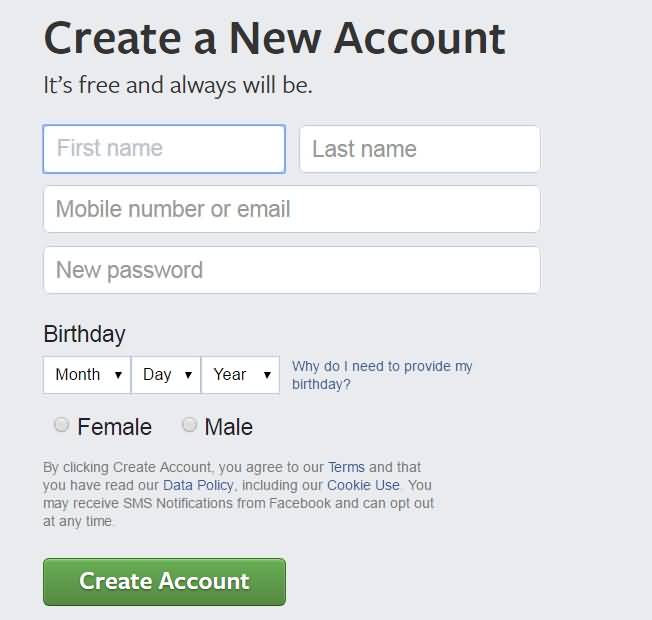
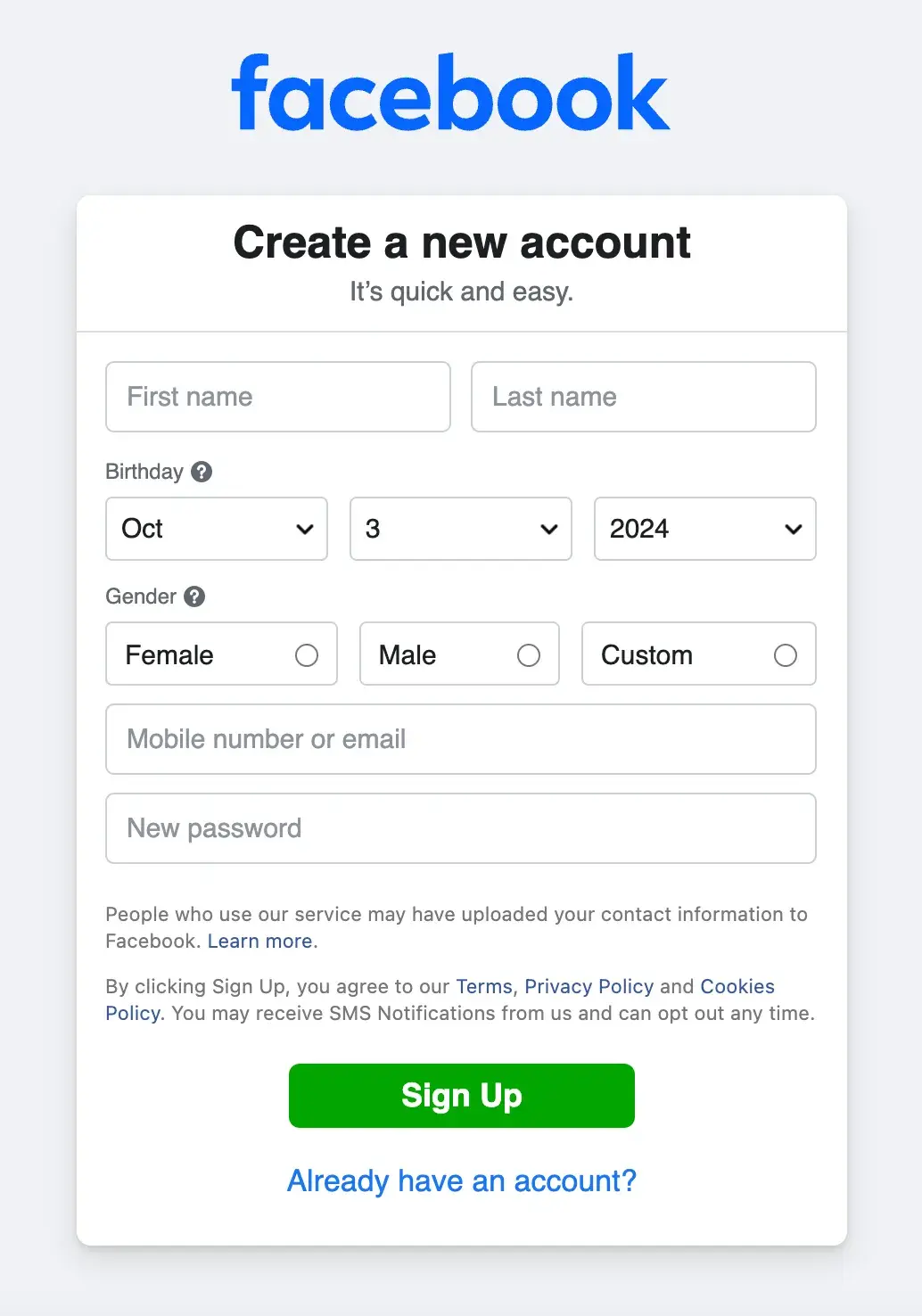
You’ll need to fill in:
-
First Name
-
Last Name
-
Mobile number or Email
-
New Password
-
Date of Birth
-
Gender
Click Sign Up after completing the form.
Make sure:
-
Your password is strong (mix of letters, numbers, symbols).
-
Your email or number is active (you’ll need verification).
Step 3: Verify Your Email or Phone Number
Facebook will send:
-
A verification code to your email
or -
An SMS code to your phone
Enter the code to confirm your facebook account.
Without verification, your Fb account may have limited access.
Step 4: Set Up Your Profile
After verification, you’ll be guided to:
-
Add profile photo
-
Add cover photo
-
Add bio
-
Add education/work details
-
Add friends
You can skip some steps, but completing them improves credibility.
How to Create Facebook Account on Mobile (Android & iPhone)
Many users prefer mobile registration.
-
Install Facebook app
-
Tap Create New Account
-
Enter details
-
Verify via SMS
-
Complete profile
The process is almost identical to desktop facebook signup.
Pro tip: Use a stable internet connection during verification to avoid errors.
Creating a Secure Fb Account
Security is crucial.
After you Create Facebook Account, immediately:
Enable Two-Factor Authentication (2FA)
Go to:
Settings → Security and Login → Two-Factor Authentication
This adds extra protection beyond password login.
Set Login Alerts
Turn on login notifications so you know if someone tries to access your facebook account.
Avoid Public WiFi Login
Hackers often target public networks.
Optimizing Your Facebook Account Profile
Once your account is active, optimization matters.
Profile Photo Tips
-
Clear face photo
-
Neutral background
-
Good lighting
Cover Photo Ideas
-
Personal branding image
-
Quote banner
-
Business theme graphic
Bio Optimization
Keep it simple:
-
Who you are
-
What you do
-
Your interests
For business users, your Fb account can act as personal branding before creating business pages.
How to Create a Business Page After Facebook Signup
Many users create a facebook account for business purposes.
Once your personal account is ready:
-
Click Menu
-
Select “Pages”
-
Click “Create Page”
-
Enter business details
You cannot create a business page without first completing facebook signup.
Common Problems During Facebook Signup
Here are frequent issues:
1. Verification Code Not Received
-
Check spam folder
-
Confirm number entered correctly
-
Request new code
2. “Email Already Used” Error
That email is linked to another facebook account. Try password recovery.
3. Account Disabled After Registration
This happens if:
-
Fake name used
-
Suspicious IP activity
-
Multiple rapid registrations
Always follow real information guidelines.
Pro Tips for Creating a Strong Facebook Account
If you want long-term success after you Create Facebook Account, follow these pro-level strategies:
-
Use your real identity to avoid verification issues later.
-
Secure your account immediately with 2FA.
-
Add at least 5–10 real friends early to build authenticity.
-
Upload a professional-looking profile image.
-
Complete your About section fully.
If you plan to use your Fb account for business or marketing:
-
Avoid aggressive friend requests.
-
Do not spam links.
-
Build trust before promotion.
-
Join niche-relevant groups.
Facebook’s algorithm rewards authentic engagement. A properly optimized facebook account builds credibility, improves reach, and prevents future restrictions.
Common Mistakes to Avoid
When completing facebook signup, avoid these common errors:
-
Using fake names.
-
Entering incorrect birth date.
-
Using weak passwords.
-
Ignoring email verification.
-
Creating multiple accounts quickly.
Many users try to create several Fb accounts for business scaling. This often triggers Facebook security systems.
Another major mistake is ignoring privacy settings. By default, some details may be public. Adjust:
Settings → Privacy → Who can see your posts?
Lastly, avoid sending too many friend requests immediately after you Create Facebook Account. It appears spammy and may lead to temporary blocks.
Smart setup prevents long-term headaches.
Advanced Strategy: Long-Term Growth After You Create Facebook Account
Most beginner guides stop at registration. But creating the account is only step one.
If your goal is growth — whether personal branding, networking, or business marketing — strategy matters.
1. Build Authority Slowly
Instead of randomly adding people, connect with:
-
Classmates
-
Colleagues
-
Industry peers
-
Local community members
Quality beats quantity.
2. Content Positioning
Start posting consistently:
-
Educational posts
-
Personal stories
-
Industry insights
-
Visual content
Facebook rewards engagement. Your facebook account becomes more visible when users interact with your content.
3. Leverage Groups
After facebook signup, join niche groups related to:
-
Your profession
-
Your hobbies
-
Your business industry
Provide value before promoting anything.
4. Account Health Monitoring
Keep your Fb account healthy:
-
Avoid copyright violations.
-
Don’t share fake news.
-
Don’t automate aggressively.
5. Transition to Business Tools
Once your account matures:
-
Create a Business Page
-
Set up Facebook Business Manager
-
Run ads professionally
The real power of Facebook comes after strategic growth — not just registration.
Frequently Asked Questions (FAQs)
1. Is it free to Create Facebook Account?
Yes, it is completely free to Create Facebook Account. Facebook does not charge users for basic registration or profile setup. You only need a valid email address or phone number to complete facebook signup. However, certain advanced features like advertising require payment. For regular personal use, messaging, posting, and connecting with friends, your Fb account remains free without hidden charges.
2. Can I create more than one Facebook account?
Facebook allows only one personal facebook account per individual under its policies. Creating multiple accounts using fake names or duplicate details can lead to suspension. If you need separate business presence, you should create a business page after you Create Facebook Account. That is the proper and safe way to manage multiple brands without violating platform rules.
3. What should I do if I forget my Facebook password?
If you forget your password, go to the login page and click “Forgot Password.” Enter your registered email or phone number linked to your Fb account. Facebook will send a recovery code. Once verified, you can reset your password securely. This process works for both new and old facebook accounts created through standard facebook signup procedures.
4. Why was my Facebook account disabled after signup?
Your facebook account may be disabled if Facebook detects suspicious behavior, fake identity information, or policy violations. Sometimes rapid friend requests or unusual login locations trigger security checks. To prevent this after you Create Facebook Account, always use real details, verify your identity properly, and avoid spam-like activity during your first few days.
5. Can I use my Facebook account for business marketing?
Yes, after you Create Facebook Account, you can use it to create business pages, join groups, and build networks. However, direct selling from your personal Fb account is limited. For professional marketing, create a dedicated business page and use Facebook Ads Manager. This ensures compliance with platform rules and improves long-term brand growth.